SayIt Windows语音输入神器 安装版 v0.1.9
SayIt是一款专为Windows用户设计的开源语音输入工具,致力于将你的口语高效、准确地转化为可直接使用的文字。它最大的亮点在于,你只需按下快捷键开始说话,经过 AI 智能整理后的文字便会魔法般地直接呈现在当前光标处,无需任何窗口切换或繁琐的复制粘贴操作。
软件图片

软件特色
- 全局语音输入 — 在任何应用中按下快捷键即可口述,文字自动插入光标位置
- AI 智能润色 — 口语自动转书面语,去口癖、纠错、分段,Prompt 完全可自定义
- 上下文感知(默认关闭)— 开启后会读取光标附近的文本,让新说的话在语气、术语和格式上与前后文衔接;先选中一段文字再开口,说出的话会被当成对它的编辑指令(翻译、精简、改写或提问),处理完直接替换选中内容。密码框会自动跳过
- 多种语音识别 — 云端可选豆包、千问、小米 MiMo、Groq Whisper;本地离线识别有 7 档 GGUF 模型(Parakeet Unified EN、SenseVoice、Fun-ASR Nano、Nemotron 3.5、Qwen3-ASR 三档),可用显卡加速
- 中英双语界面 — 默认跟随系统语言,也可以在设置里随时切换
- 热词增强 — 自定义专业术语词表;豆包、千问、服务器模式和本地 Qwen3-ASR 会参与 ASR 识别偏置,本地 SenseVoice 则通过 AI 整理/文本处理做后处理纠错
- 悬浮窗反馈 — 录音状态、波形动画、按住时长实时可见;豆包、千问实时 ASR 下还能边说边出字幕
- 历史记录 — 所有转录结果本地保存,支持搜索和收藏
- 隐私可控 — 支持完全自部署,数据流向透明
软件故事
为什么做 SayIt
在 AI 时代,模型的输出 Token 速度越来越快,人却受限于打字速度。特别是和 AI 对话时,说话是非常自然和高效的方式。我最开始用的是 Typeless,体验确实很好,Typeless 也开启了全民 VibeCoding 语音输入法的时代😁。但用了一段时间发现:价格太贵,AI 润色的 Prompt 不能自定义,有时候我并不想要那么格式化的整理,Typeless 的 AI 整理功能相对激进。
看了一下市面上其他 VibeCoding 出来的语音输入工具,大部分都是个人使用为主,很少有面向团队和企业内部使用的。所以我想做一个既适合个人使用,又可以给团队和企业内部部署的语音输入工具——Prompt 完全可控,部署方式灵活,数据流向透明。
语音输入的核心就两个技术:语音识别(ASR) 和 AI 文本润色。我基本上测试了市面上开源和闭源的各大语音识别模型,个人大体排名是:
豆包 > Typeless ≈ Qwen3-ASR > FunASR-Nano2512 >= FireRedASR2 > Whisper中文语音识别,豆包实际测试效果非常好,用手机上的豆包输入法就能很好地感受出来。豆包悄悄话的识别是断层领先的——我很多场景都是小声说话,毕竟工位上也不太好和 AI 大声聊天。
SayIt 后端部署使用的是 Qwen3-ASR,效果仅次于豆包,开源模型里算是最好的选择。如果是自己部署后端在公司内部使用,我使用 vLLM 为 Qwen-ASR 的推理速度做了优化,能够更快的进行推理识别。
我大大低估了 VibeCoding 想要产品化的难度。这个软件最初的形态大概 2~3 天就弄出来了,但想要公开给大家使用,耗费了 x50 倍的时间和精力。软件叫什么名字、Logo 怎么设计、前端样式是否好看、用户如何提交反馈、如何捕获报错信息、服务器端多用户多并发、如何加快识别速度……每一个场景都是可以持续优化。
这是一个开源项目,我没有准备用它盈利。做这个纯粹是我个人对语音输入的需求很强,而且现在 AI 极大地放大了个人的能力。如果你觉得这个产品好用,可以点一个 ⭐ Star,这会激励我继续维护这个项目,或者在软件主页给我反馈。
版本日志
v0.1.9
Added
Server mode can use your own AI provider for the cleanup step. The AI provider page
has a new "run AI cleanup locally" switch at the top, shown only in Server mode. Turn it
on and the server does speech recognition only; cleanup is handled on your machine,
talking directly to whichever AI provider you selected on that page. Your API key, your
AI prompt and any text picked up by context-aware writing are never sent to the SayIt
server. Off by default.
New WebDAV backup. Fill in the address and credentials for your own storage under
Settings → General; anything that speaks WebDAV works, including Nutstore. Settings are
backed up by default, with history and recordings available as separate options. Backups
contain the API keys for every provider you configured, so make sure that storage is
yours alone. Schedules range from daily to weekly, and you can back up or restore from
the server by hand at any time.
New speech recognition service: Qwen Audio 3.0 streaming. Text arrives as you speak,
with live captions in the overlay. If you want live captions, this is the most accurate
option available, and it is quick. All it needs is a Bailian API key — no workspace ID.
Hotwords are handed to the model's own instant hotword feature, which accepts weights and
up to 100 entries. Select it under Settings → Speech recognition; if you have already
entered a Bailian API key, the card appears on its own after the upgrade.
Improved
You no longer have to guess which speech recognition service to pick. Each card now
says what it suits: Doubao is the most accurate for Chinese with live captions off, and
Qwen Audio 3.0 takes over once they are on. Several cards used to read "accurate and
fast", which left you no wiser about which to choose. The "for mainland China accounts"
line that hung off every card is gone too, keeping only the one that genuinely needs
saying (Groq requires a connection outside mainland China).
Fixed
The overlay no longer jumps up and down as hints come and go. When the microphone
source hint disappears, or when you never speak and the recording ends with "No speech
detected", the overlay no longer shrinks abruptly or shifts position; different states
keep a consistent visible height until the overlay closes.
软件下载
开源地址:https://github.com/crosswk/SayIt/
夸克网盘:https://pan.quark.cn/s/9fa46388cb60
迅雷网盘:https://pan.xunlei.com/s/VP0NGF2jfeI6j-gUP_Pc39STA1?pwd=xfgy#
百度网盘:https://pan.baidu.com/s/1umRLugTrx49lCkLhkbqykw?pwd=ctpc 提取码: ctpc
移动网盘:https://yun.139.com/shareweb/#/w/i/2xop35eedfeey 提取码:i0oz
UC网盘:https://drive.uc.cn/s/55ea236fe2114?public=1
本地下载
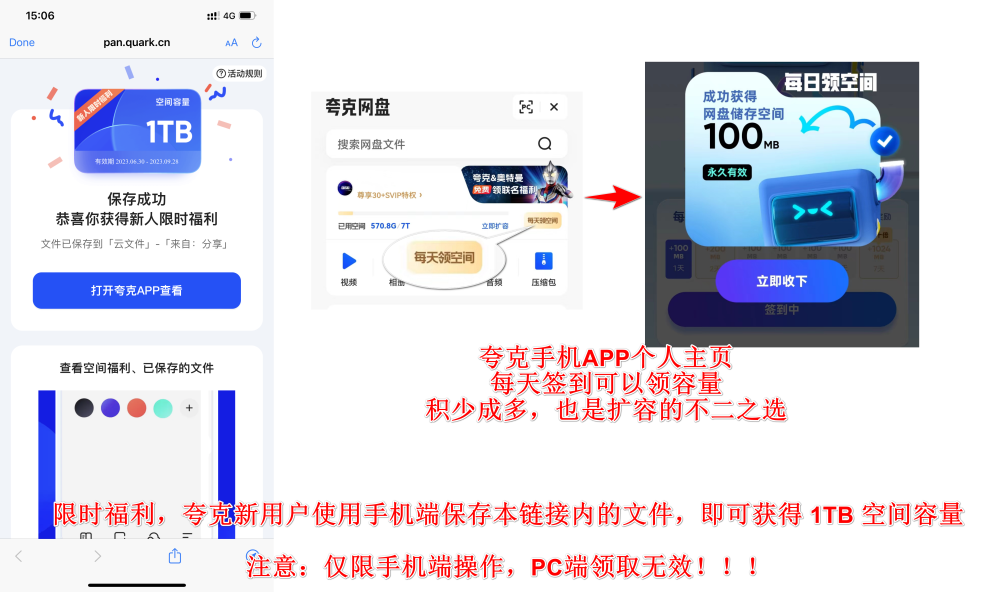
网盘空间不够的可以参考下面的方法获取更多空间
夸克网盘空间获取:https://pan.quark.cn/s/45c661cbed7e